ip
Cloud User Guide
Cloud is a minimalistic desktop application for managing tasks, deadlines and events.
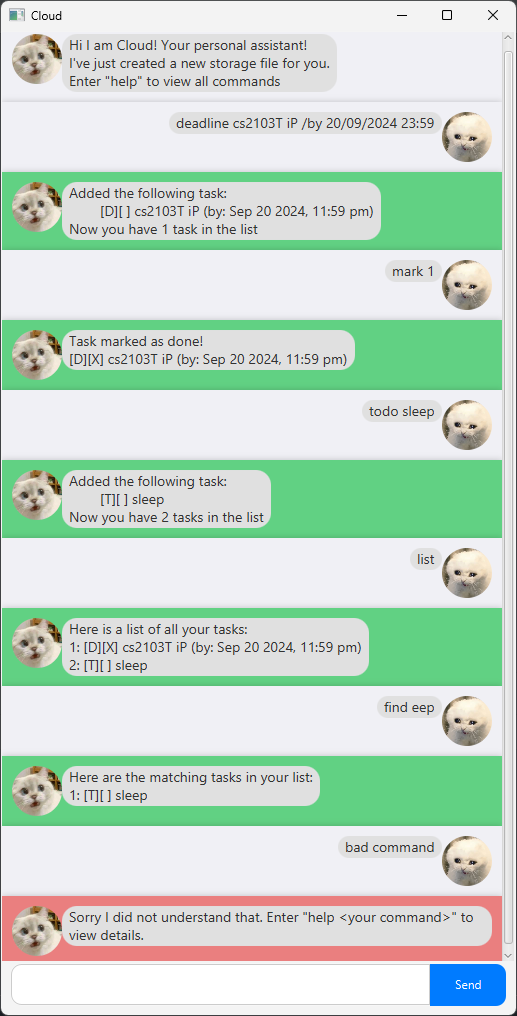
Quick start
- Ensure you have
Java 17installed. - Download the latest
.jarfile from here into an empty folder. - Open a command terminal,
cdinto the folder containing the jar file, and runjava -jar cloud.jar.
Adding todos: todo
Create a todo task with a description.
Format: todo DESCRIPTION
- All fields are mandatory
Examples:
todo Wash the car
Adding deadlines: deadline
Create a deadline task with a description and a due date and time.
Format: deadline DESCRIPTION /by DD/MM/YYYY HH:mm
- All fields are mandatory
- Time must be in 24-hour format
Examples:
deadline Submit assignment /by 24/09/2024 23:59
Adding events: event
Create an event task with a description, a start date-time and an end date-time.
Format: event DESCRIPTION /from DD/MM/YYYY HH:mm /to DD/MM/YYYY HH:mm
- All fields are mandatory
- Time must be in 24-hour format
Examples:
event CS2104 midterms /from 03/10/2024 12:00 /to 03/10/2024 14:00event Hackathon /from 13/11/2024 13:00 /to 14/11/2024 15:00
Listing all tasks: list
Shows a list of all tasks
Format: list
Finding tasks by keyword: find
Find tasks with descriptions that contain the keyword
Format: find KEYWORDS
- Only the description will be searched
- Find is case-insensitive e.g.
LUNCHwill matchLunch - Partial words can be matched e.g.
eepywill matchSleepy
Deleting tasks: delete
Delete task by index as displayed by list
Format: delete INDEX
- Index refers to the index number shown in the displayed task list
- Index must be a positive integer
Examples:
delete 2deletes the 2nd task in the list displayed bylist
Marking tasks: mark
Mark a task as done
Format: mark INDEX
- Index refers to the index number shown in the displayed task list
- Index must be a positive integer
Examples:
mark 2marks the 2nd task in the list displayed bylistas completed
Unmarking tasks: unmark
Mark a task as not done
Format: unmark INDEX
- Index refers to the index number shown in the displayed task list
- Index must be a positive integer
Examples:
unmark 2marks the 2nd task in the list displayed bylistas not completed
View command help: help
View command details
Format: help [COMMAND]
COMMANDis optional- Specifying
COMMANDshows the details for that command only - Omitting
COMMANDshows a list of details for all commands
Examples:
helphelp deadline